Making complex web apps faster
#Making #complex #web #apps #faster
On the web, speed is everything. The responsiveness of your browser, the time it takes for a web app to appear, and how quickly that app handles user interactions all directly impact your experience as a web user.
At Microsoft, we care deeply about improving web performance, and we’re making progress on it from several directions:
- Within the browser itself, by making Edge faster and more responsive.
- Under the hood, by making the browser engine run complex web apps faster.
- And finally, by helping web developers build faster web apps.
Based on our own experience, we know that complex applications require complex architectures that sometimes rely on multiple windows, iframes, or worker threads. To deal with the slowdowns that these multiple parallel contexts can introduce, we’re proposing a new feature for web developers: the Delayed Message Timing API.
If you’re a web developer, continue reading to learn more about the Delayed Message Timing API proposal, and let us know if it might help you make your own web app faster, or share ways in which the API could be better.
What causes delays in cross-context messaging?
Delays can occur when an app exchanges a lot of messages between its various contexts, such as the app’s main window, worker threads, or iframes. If those messages get queued and are not processed promptly, delays occur.
These delays can degrade the user experience by making the application feel unresponsive. While it’s easy to witness the delay, identifying its root cause is challenging with current development tools.
Let’s review the three types of delays which can occur when exchanging messages between contexts with the postMessage() API, and how the Delayed Message Timing API can help diagnose their root cause.
Slowdown 1 – The receiving context is busy
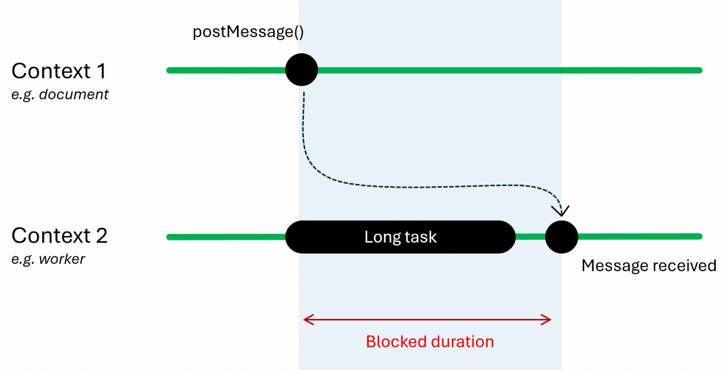
As the following diagram illustrates, the context to which you’re sending a message might be processing a long synchronous task, effectively blocking its thread, causing your message to be queued up before it can be processed:
To understand if the receiver of the message is busy with other tasks, you need to know how long the message was blocked.
To do this, the Delayed Message Timing API introduces the blockedDuration property, which represents the amount of time a message had to wait in the queue before being processed.
Slowdown 2 – The task queue is congested
Another possible reason for cross-document messaging slowdowns is when the task queue of a context is overloaded with many short tasks.
In a webpage’s main thread, this can often happen when the queue is saturated with high-priority tasks such as user interactions, network handling, and other internal system overhead tasks like navigation, loading, and rendering. In a worker, congestion can occur when many messages are posted in a short period of time. In both cases, tasks or messages arrive faster than they can be processed, creating a backlog that delays subsequent messages, including those that might be time sensitive.
Although each individual task isn’t long, together, they accumulate and cause congestion, which effectively acts like a single long task.
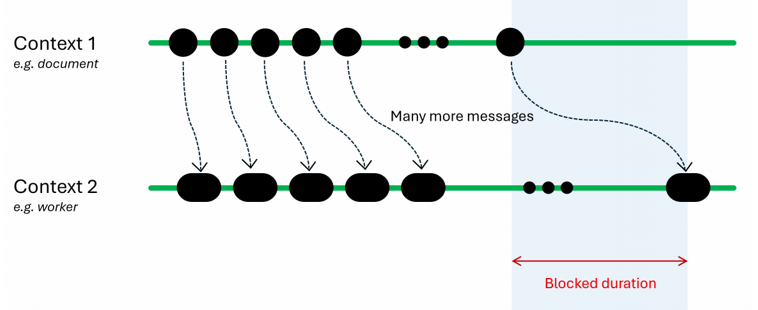
To help diagnose this situation, the Delayed Message Timing API introduces the taskCount and scriptTaskCount properties, to show how many tasks were blocking the message.
Slowdown 3 – Serialization and deserialization overhead
Before crossing the boundaries between contexts, messages must be serialized and then deserialized again when received.
These operations occur synchronously on the same threads where the messages are sent and received. Serializing and deserializing messages can therefore introduce noticeable overhead, particularly when sending a lot of data over postMessage().
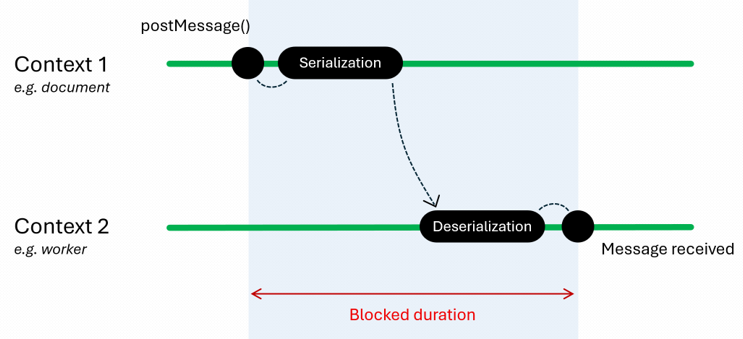
While the serialization and deserialization operations are internal to the browser and you can’t change them, the Delayed Message Timing API provides the serialization and deserialization properties to accurately measure their duration.
Using the Delayed Message Timing API
The API will work with windows, tabs, iframes, or workers, and will cover cross-document messaging, cross-worker/document messaging, channel messaging, and broadcast channels.
For a complete round-trip timing analysis, you’ll need to correlate the Performance entries that you collect from both the sender and receiver contexts. To learn more, check out the explainer.
The following code snippet shows how to use the proposed API:
// Create a PerformanceObserver instance.
const observer = new PerformanceObserver((list) => {
  console.log(list.getEntries());
});

// Start observing "delayed-message" Performance entries.
observer.observe({type: 'delayed-message', buffered: true});
And here is an example of the properties available on the corresponding “delayed-message” Performance entry:
{
    "name": "delayed-message",
    "entryType": "delayed-message",
    "startTime": 154.90000009536743,
    "duration": 169,
    "traceId": 4,
    // The type of message-passing event.
    "messageType": "cross-worker-document",
    // The timestamp for when the message was added to the task queue.
    "sentTime": 155,
    // The timestamps for when the receiving context started and stopped
    // processing the message.
    "processingStart": 274.90000009536743,
    "processingEnd": 324.7000000476837,
    // The time the message spent waiting in the receiver's task queue.
    "blockedDuration": 119.90000009536743,
    // The time needed to serialize and deserialize the message.
    "serialization": 0,
    "deserialization": 0,
    // The number of queued tasks blocking the postMessage event.
    "taskCount": 38,
    // The number of entry-point JavaScript tasks, including those with
    // a duration lower than 5ms.
    "scriptTaskCount": 2,
    // The time needed to run all script.
    "totalScriptDuration": 119,
     // The list of PerformanceScriptTiming instances that contribute to the
     // delay.
    "scripts": [
        {
            "name": "script",
            "entryType": "script",
            "startTime": 154.90000009536743,
            "duration": 119,
            "invoker": "DedicatedWorkerGlobalScope.onmessage",
            "invokerType": "event-listener",
            "windowAttribution": "other",
            "executionStart": 154.90000009536743,
            "forcedStyleAndLayoutDuration": 0,
            "pauseDuration": 0,
            "sourceURL": "...",
            "sourceFunctionName": "runLongTaskOnWorker",
            "sourceCharPosition": 267
        }
    ],
    // The PerformanceMessageScriptInfo instance which provides details
    // about the script that sent the message.
    "invoker": {
        "name": "invoker",
        "sourceURL": "...",
        "sourceFunctionName": "sendMessage",
        "sourceCharPosition": 531,
        "sourceColumnNumber": 14,
        "sourceLineNumber": 13,
        "executionContext": {
            "name": "",
            "type": "window",
            "id": 0
        }
    },
    // The PerformanceMessageScriptInfo instance which provides details
    // about the script that handled (or is handling) the message.
    "receiver": {
        "name": "receiver",
        "sourceURL": "...",
        "sourceFunctionName": "runLongTaskOnWorker",
        "sourceCharPosition": 267,
        "sourceColumnNumber": 41,
        "sourceLineNumber": 9,
        "executionContext": {
            "name": "",
            "type": "dedicated-worker",
            "id": 1
        }
    }
}
Let us know what you think
The Delayed Message Timing API is in its early stages, and we’d love to hear your feedback about this proposal. There may be additional scenarios where cross-context slowdowns occur in your apps today and sharing your experiences with us will help us design the right API for you.
Take a look at our proposal and let us know your feedback by opening a new issue on the MSEdgeExplainers repo.
Source link